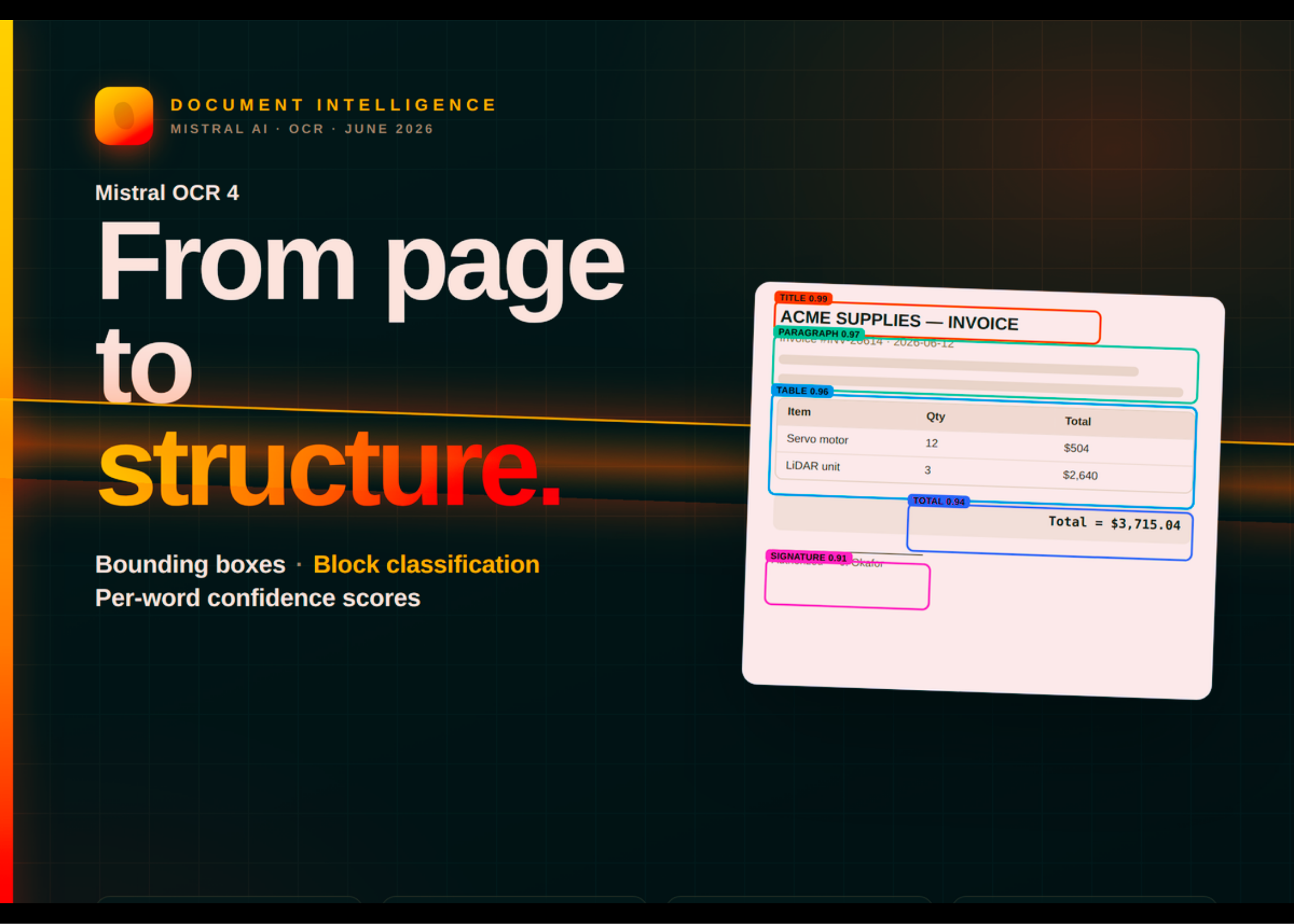


Today, Mistral AI released OCR 4, its latest document-understanding model. This new release adds bounding boxes, block classification, and inline confidence scores alongside extracted text. It supports 170 languages across 10 language groups and runs in a single container for fully self-hosted deployments. OCR 4 also serves as an ingestion component for enterprise search, RAG, and domain-specific retrieval pipelines.
TL;DR
- OCR 4 returns bounding boxes, typed-block labels, and per-word confidence scores, not just text.
- It supports 170 languages across 10 groups, with gains on rare and low-resource languages.
- Independent annotators preferred OCR 4 over every system tested, averaging 72% win rates.
- Pricing is $4 per 1,000 pages, dropping to $2 with the Batch-API discount.
- One endpoint serves both raw extraction and schema-driven Document AI output.
Mistral OCR 4
Mistral OCR 4 extracts and structures content from a wide range of documents. Previous generations focused on converting a page into clean text and tables. OCR 4 instead returns a structured representation of the whole document.
Each block is localized with a bounding box and classified by type. Block types include titles, tables, equations, signatures, and more. Inline confidence scores are generated per-page and per-word.
Downstream systems therefore learn more than what a document says. They also learn where each element sits, what role it plays, and how confident the model is. That extra context matters for citations, redactions, and human-in-the-loop verification.

OCR 4 accepts common enterprise formats, including PDF, DOC, PPT, and OpenDocument. The model is compact enough to deploy in a single container. Self-managed deployment is available to enterprise customers for data residency and compliance.
Benchmark
Mistral compared OCR 4 against AI-native OCR models, frontier general-purpose models, enterprise document services, and Mistral OCR 3.
A number of independent annotators preferred OCR 4 over every leading system tested. Win rates averaged 72% across the comparison set. The evaluation used 600+ documents across 12+ languages, sourced from third-party vendors. Annotators ranked each competitor’s output against OCR 4’s, document by document.
On automated benchmarks, OCR 4 scored 85.20 on the public OlmOCRBench. It scored 93.07 on OmniDocBench and .98 on Mistral’s internal Crawl Multilingual evaluation.
Two customer data points add context. Rogo reported equivalent accuracy at roughly 8x lower cost and 17x lower latency versus leading agentic parsers. Anaqua measured roughly 4x faster per page than its incumbent provider.
Segmentation, Not Just Text
Bounding boxes were Mistral’s most-requested capability. They localize text for in-context highlighting and reliable data pipelines.
Block types and confidence scores serve different jobs. They drive source-grounded citations, redactions, and human-in-the-loop verification. This structure supports several downstream workloads.
Clean, classified blocks become better retrieval units for RAG. Agents gain structural primitives to act on documents, not just read them. Connectors receive consistent, typed output for ingestion and indexing.
OCR 4 is also an ingestion component of Mistral Search Toolkit, now in public preview. Search Toolkit is Mistral’s open-source, composable search framework. Its structured output supplies citation-ready inputs to retrieval and evaluation workflows.
Use Cases With Examples
OCR 4 supports both high-volume pipelines and interactive document workflows.
- Document parsing and extraction: Turn a multilingual contract into clean, structured markdown for indexing.
- Retrieval-Augmented Generation (RAG): Feed classified blocks into Search Toolkit for source-grounded answers with citations.
- Agentic workflows: Give an invoice-processing agent typed fields and bounding boxes to fill forms automatically.
- Confidence-gated pipelines: Route low-confidence regions to human verifiers, and auto-approve the rest.
- Enterprise search: Use OCR 4 as a data-source component for ingestion and entity extraction across an archive.
Early users apply OCR 4 to turn invoices into structured fields and digitize company archives. Others extract clean text from technical reports or power enterprise search.
A note on scope from Mistral official release: OCR 4 is a document-understanding model, not a decision-maker. It is not intended for medical diagnosis, legal judgment, or high-stakes financial decisions. It is also unsuited to safety-critical systems, real-time processing, or non-document inputs like raw audio or video.
OCR 4 ships behind a single API endpoint. Every request runs the same model. It always returns extracted content, bounding boxes, block types, confidence scores, and markdown. What varies is how much you layer on top.
The decision rule is simple. Need raw extracted content? Use OCR 4 as-is. Need the output reshaped into a schema or annotated with domain fields? Add the Document AI parameters to the same call.
Working With the API
Basic extraction takes a document URL and returns structured pages. Set include_blocks=True to get the typed blocks and bounding boxes.
from mistralai.client import Mistral
client = Mistral(api_key=os.environ[“MISTRAL_API_KEY”])
ocr_response = client.ocr.process(
model=”mistral-ocr-latest”,
document={
“type”: “document_url”,
“document_url”: “https://arxiv.org/pdf/2201.04234″
},
include_blocks=True, # typed blocks + bounding boxes
table_format=”html”, # None (inline), “markdown”, or “html”
include_image_base64=True
)
The response is a JSON object with a pages array. Each page carries markdown, images, tables, hyperlinks, dimensions, and confidence_scores. To gate a human-review pipeline, request per-word confidence.
model=”mistral-ocr-latest”,
document={“type”: “document_url”,
“document_url”: “https://arxiv.org/pdf/2201.04234″},
confidence_scores_granularity=”word” # or “page” for aggregates
)
The “word” setting adds a word_confidence_scores array per page and per table entry. For high-volume jobs, Mistral recommends the Batch Inference service, which halves the per-page cost.
Try It: Interactive Output Explorer
The embed below visualizes OCR 4’s structured output. Switch between sample documents, toggle bounding boxes and block types, and turn on the confidence heatmap. The Markdown and JSON tabs show the two output shapes side by side. The sample data is illustrative, not a live API call.
Check out the Mistral OCR 4 announcement, OCR 4 model card, and OCR Processor docs. Also, feel free to follow us on Twitter and don’t forget to join our 150k+ML SubReddit and Subscribe to our Newsletter. Wait! are you on telegram? now you can join us on telegram as well.
Need to partner with us for promoting your GitHub Repo OR Hugging Face Page OR Product Release OR Webinar etc.? Connect with us
Sources: Mistral OCR 4 announcement, OCR 4 model card, OCR Processor docs.